PaperKnife Plus: Offline PDF editing and repair for Android users
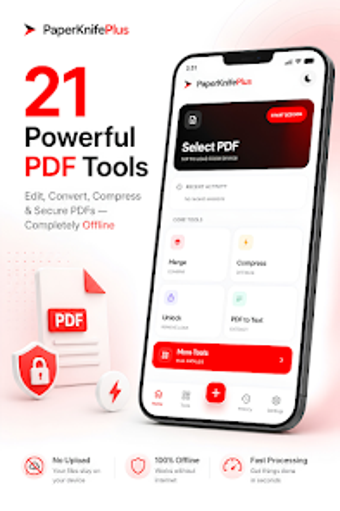
Try PaperKnife Plus - PDF Editor by Para Commando to manage and edit PDFs privately on Android. It performs on-device merging, splitting, compression, image-to-PDF conversion, page reordering, text extraction, watermarking and digital signing, plus a repair tool for damaged PDF files without network access. Zero-Server Architecture keeps all processing local; the app also compresses documents efficiently and exports images and multi-page PDFs from photos. Students, legal workers and privacy-conscious professionals get offline editing and repair tools suited to sensitive paperwork.
Handles full PDF workflows without relying on external servers
Experience an on-device editor that combines document reading with professional editing tools. Moreover, the app uses a Zero-Server Architecture so merging, splitting, image-to-PDF conversion, page rearrangement, compression, watermarking and digital signing all run locally. The interface exposes those utilities in direct actions, and a dedicated PDF repair utility lets you attempt recovery on damaged files without leaving the device.
Operates with a mobile-focused, lightweight design
In addition, the app is optimized for Android mobile performance and emphasizes offline efficiency. It requires only standard file access permissions to manipulate local storage, so network bandwidth is not necessary for processing. The developer designed it as a lightweight document tool that avoids heavy resource demands; as a result, typical editing operations occur on-device and do not rely on external databases or servers.
Protects privacy through local encryption and permission-based access
Security features operate locally: the Lock & Unlock utility adds or removes password protection, and encryption applies to files on the device. In addition, users can apply digital signatures and custom watermarks to assert authorship. Because every operation takes place offline, documents are not uploaded to third-party systems. The app still requires file permissions from the device, so administrators should verify access rights before bulk operations.
Well-suited to single-device, privacy-minded users; collaboration is the main trade-off
The app serves students, legal workers, and privacy-conscious professionals and benefits from user reports praising its straightforward interface and reliable local processing. For routine maintenance, run batch tasks during idle hours to reduce interruption. The principal limitation is collaboration: the tool does not offer shared editing or server sync, so it matches solo workflows better than team-based document pipelines.